
Waiting time: hours instead of weeks
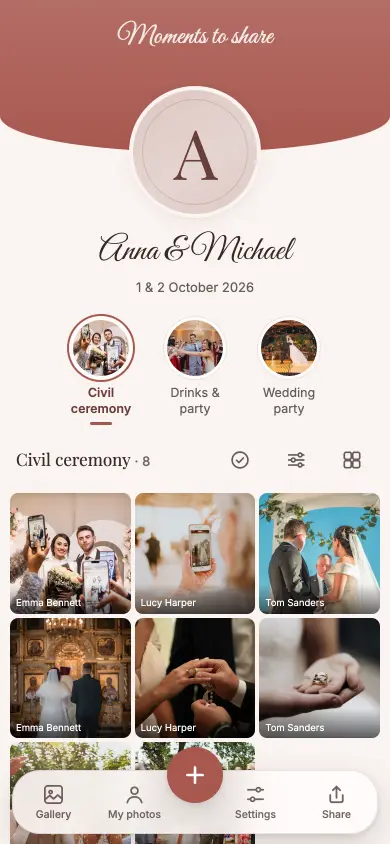
Guest photos are visible straight away and run as a slideshow in the room while the celebration is still going. A photo that didn’t come out is retaken on the spot instead of turning up later as a reject.
Comparison
The QR code costs the same table card and delivers more: photos the same evening, in full resolution, with no collecting and no lab.
Free, no subscription
The mechanics are charming: one camera per table, 27 exposures, everyone joins in. Afterwards the cameras have to be collected — including the ones in handbags — then developed, then comes the waiting.
And film has no screen. Nobody sees whether the photo is sharp, and in a dark venue the built-in flash reaches two to three metres. What is usable in the end is decided six weeks later at the lab.
Guest photos are visible straight away and run as a slideshow in the room while the celebration is still going. A photo that didn’t come out is retaken on the spot instead of turning up later as a reject.
No cameras to collect, nothing to take to the lab, nothing to pick up. The table card carries nothing but a QR code.
Film can’t record a speech. Migumento takes videos up to a gigabyte, without downsizing.
Cameras on the tables for the look, the album for everything else — that’s the most common solution. The developed photos can be scanned and stored in the same album, and in the end everything sits in one place.
Two tools for the same table card. Anything that varies by lab or provider is shown as a range rather than an invented number.
| Disposable camera on the table | Migumento | |
|---|---|---|
| Purchase | depends on provider, per camera | free up to 400 MB of event size, above that a one-off from $23 |
| Extra costs afterwards | developing, depends on the lab | Best in row: none |
| Photos visible | after developing | Best in row: straight away, during the celebration |
| Number of photos | 27 exposures per camera (typical) | Best in row: no fixed number per table |
| Control over the result | none — no screen | Best in row: the guest sees the photo straight away |
| Dark venue | flash range two to three metres | Best in row: the guest’s camera, with its night mode |
| Video | no | Best in row: yes, up to 1 GB per video |
| Logistics after the celebration | collect, develop, pick up | Best in row: none |
| Live slideshow in the room | no | Best in row: yes |
| Look | Best in row: film — not digitally reproducible | digital |
Checked on 1 October 2026 · Provider details as stated on their own websites, without guarantee · Quotations are the providers’ own wording, in the original language · Has something changed? info@migumento.com
If you want complete, usable photos with no aftermath, choose the album: collecting costs nothing, every guest already has a camera on them, and by Monday everything is there. Four reasons favour the disposable camera, and none of them are technical.
The free plan is not a trial run: all guests, all photos, all videos, the Live Wall — and up to 400 MB of event size you download the originals too, for 6 months. For bigger celebrations there are one-off plans with 12 or 24 months from the unlock. No subscription.
For every event
For the small, lovely moments.
$0
free, no subscription
For special occasions
Special days deserve more room.
$23
one-off, per event
Our recommendation
For your big day. And every moment of it.
$60
one-off, per event
Every plan has every feature. Collect, share and enjoy it together.
Prices in USD. Outside this currency area, Stripe converts at checkout using the day’s rate. A paid event stays reachable for 12 or 24 months from the unlock, depending on the plan, never shorter than the free window of 6 months from the day you create the event. Extending gives you the plan’s months again, as often as you like. If it’s not right, you get your money back within 60 days — Terms and conditions.
Collecting is free with us; unlocking is a one-off payment from $23, no subscription. With disposable cameras you add up cameras and developing per table.
Yes: cameras for the look, the album for completeness. You can scan the developed photos and put them in the same album.
No app: scanning the QR code or opening the link is enough. The photos arrive as the phone saved them — up to 50 megabytes per photo.
The usual is one per table, with 27 exposures — and some of them end up unusable.
Create the album before the table cards go to print — the QR code fits on the same card.